- Toast Community
- Discussions
- Guest Experience
- Guest Feedback
- Subscribe to RSS Feed
- Mark Topic as New
- Mark Topic as Read
- Float this Topic for Current User
- Printer Friendly Page
Guest Feedback

09-18-2025 09:58 AM
Regarding Guest Feedback inbox:
There is an AI "do not respond" email that pops up but I want to use an email they CAN respond to. If a customer leaves a negative review I want to be able to respond by giving them a gift card and typically asking more questions regarding their experience. Can I control which email the feedback comes from within the guest feedback section? I currently just copy their comment and use my own email.
I'd also like to make notes on how I resolved it but I don't see a section for that, only a way to "mark as resolved". Is there somewhere to make notes that you know of?
THANKS!
- Labels:
-
New & Returning Guests


09-18-2025 03:57 PM
Thanks for reaching out with these great questions! I don't think you can change the automated email, you can control which email this feedback is sent to via the Users to be Notified section. It seems you can leave notes, there seems to be a box area to add text to, an image attached, and a link attached to the article!
Enable and Manage Guest Feedback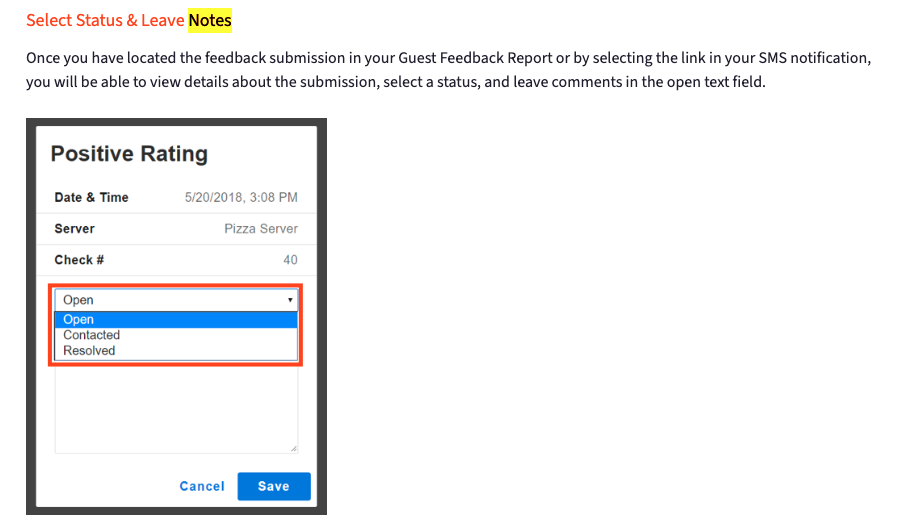
Robert Anderson, Community Manager
Toast

